1.6. Changing compute resources of a VM
In this chapter, you will increase the CPU and memory of your virtual machine.
Note
As long as you stay within four times the currently allocated amount of CPU and memory, the changes will be applied live, without a restart of the VM, by using “Live Migration”. More on “Live Migration” in a later chapter.Task 1.6.1: Increase CPU and memory of your VM in the web console
The tab “Configuration” of your VM allows you to change the specifics of your VM, including the compute resources.
Task hint
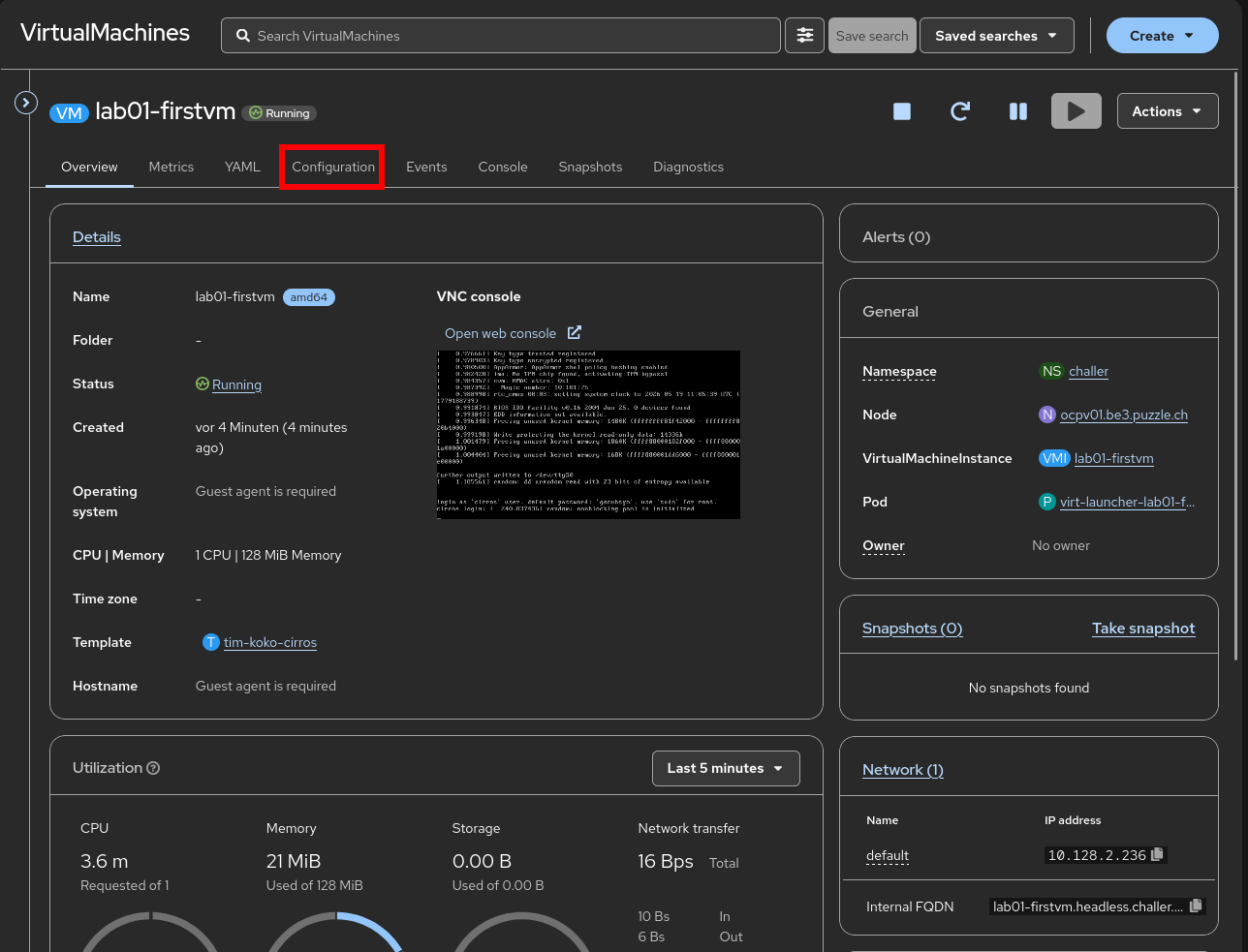
Navigate to your VM and click on “Configuration”:
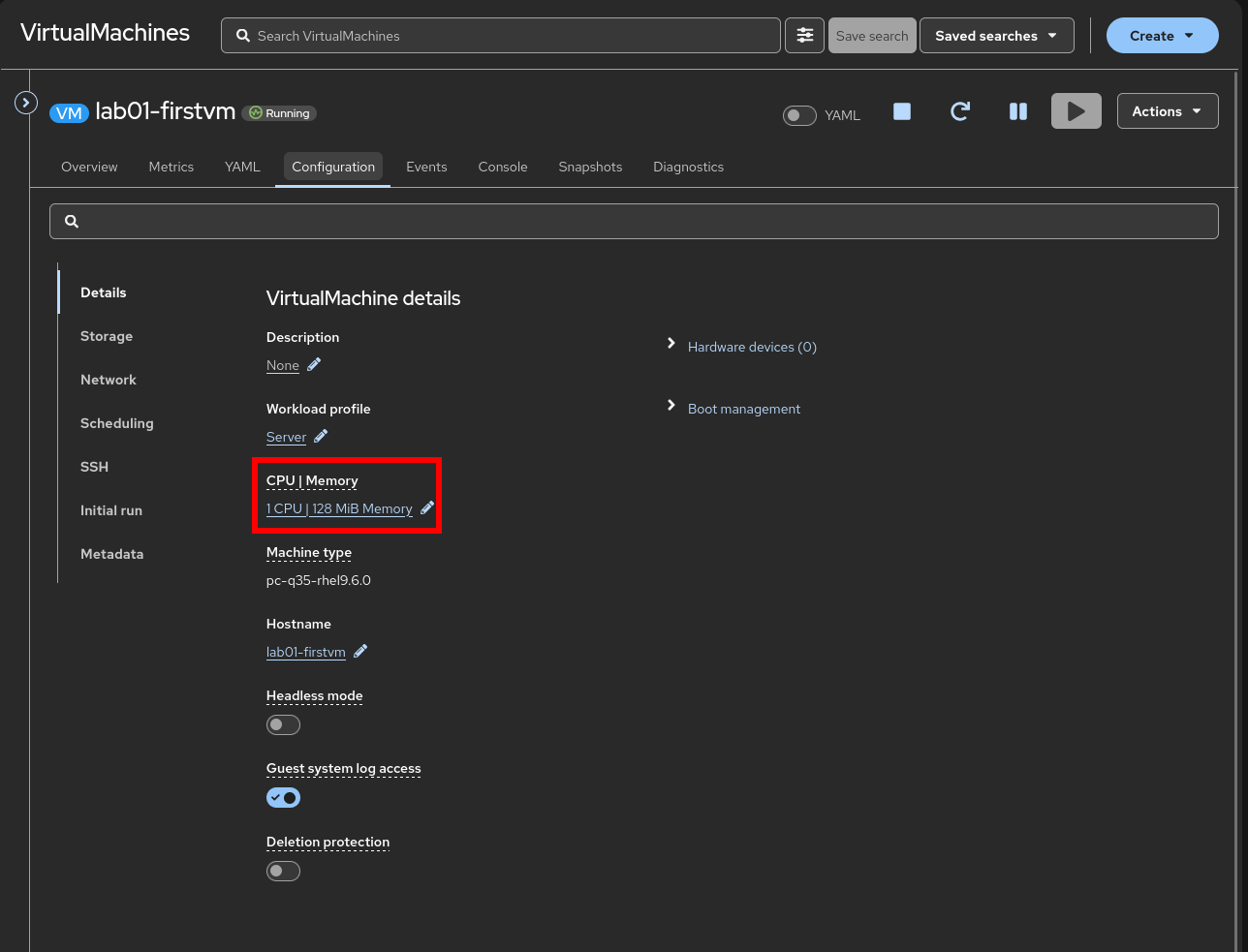
Click on the current CPU and memory resources to change them:
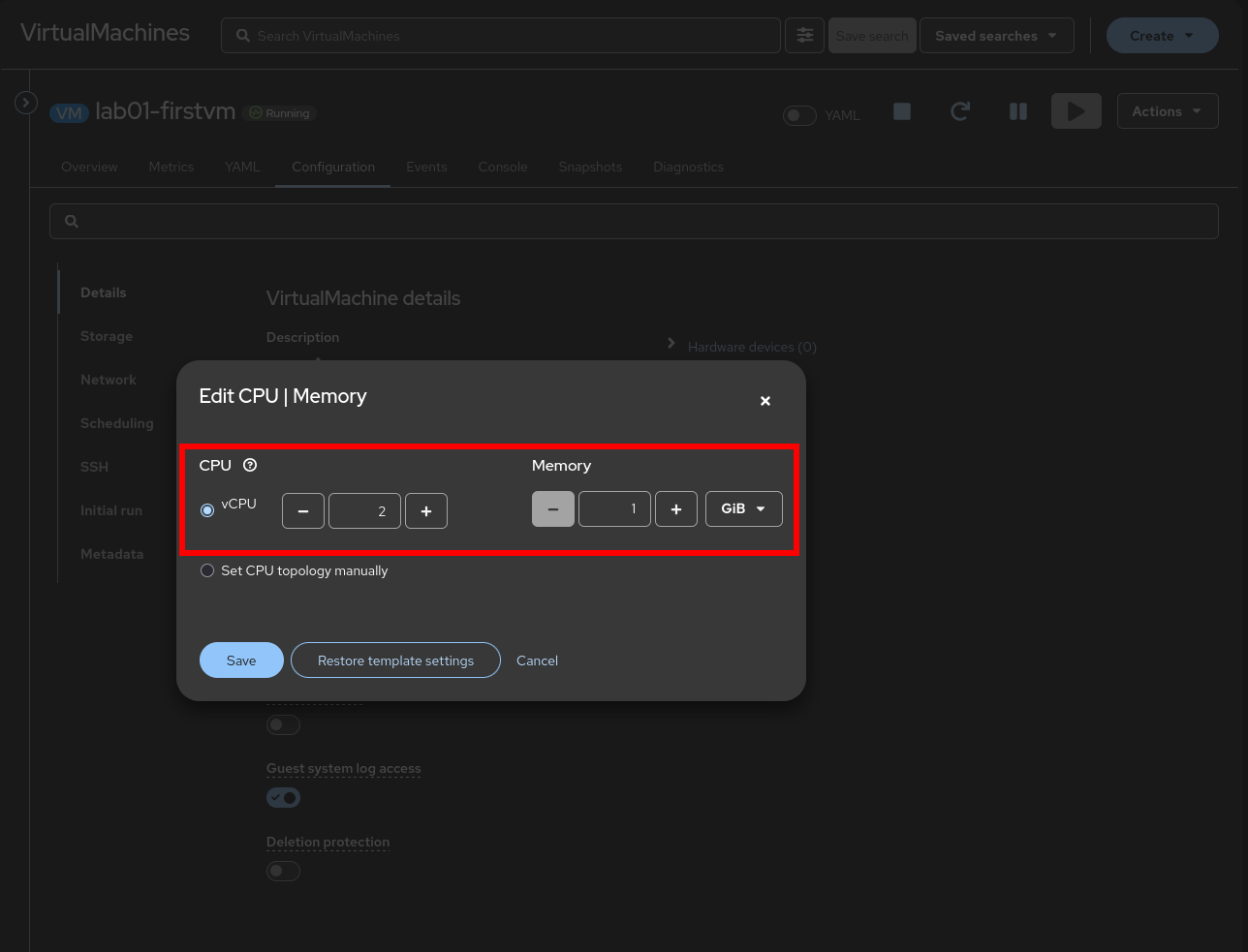
Select the desired target CPU and memory value, then click save:
Task 1.6.2: Increase CPU and memory of your VM on the CLI
To increase the compute resources of your VM on the CLI, you can edit or patch the VirtualMachine object.
Task hint
oc --namespace lab-<username> \
  patch vm lab01-firstvm --type='json' -p=\
  '[{"op": "replace", "path": "/spec/template/spec/domain/cpu/sockets", "value": 2}, \
    {"op": "replace", "path": "/spec/template/spec/domain/memory/guest", "value": 1Gi}]'
If your change is applied by live migrating the VM, you can watch the progress of the migration.
Note
Since our VM has less than 1GiB of memory, memory-hotplug is not supported and the VM has to be restarted for the new memory allocation to take effect.watch "oc --namespace lab-<username> \
get vmi lab01-firstvm -o jsonpath=\
'{.status.conditions}{.status.currentCPUTopology}{.status.memory}'|jq"
Note
For this command to work,jq has to be available on your system. Alternatively you can just watch the status fields of your VirtualMachine object.The output should be similar to:
Every 2.0s: oc --namespace lab-<username> \
  get vmi lab01-firstvm -o jsonpath=\
  '{.status.conditions}{.status.currentCPUTopology}{.status.memory}'|jq
[
  {
    "lastProbeTime": null,
    "lastTransitionTime": "2026-05-19T11:05:36Z",
    "status": "True",
    "type": "Ready"
  },
  {
    "lastProbeTime": null,
    "lastTransitionTime": null,
    "status": "True",
    "type": "LiveMigratable"
  },
  {
    "lastProbeTime": null,
    "lastTransitionTime": null,
    "status": "True",
    "type": "StorageLiveMigratable"
  }
]
{
  "cores": 1,
  "sockets": 1,
  "threads": 1
}
{
  "guestAtBoot": "128Mi",
  "guestCurrent": "128Mi",
  "guestRequested": "128Mi"
}
When the live migration takes place, the output should indicate with HotVCPUChange that the CPU can be hot-plugged:
Every 2.0s: oc --namespace lab-<username> \
  get vmi lab01-firstvm -o jsonpath=\
  '{.status.conditions}{.status.currentCPUTopology}{.status.memory}'|jq
[
  {
    "lastProbeTime": null,
    "lastTransitionTime": "2026-05-19T11:05:36Z",
    "status": "True",
    "type": "Ready"
  },
  {
    "lastProbeTime": null,
    "lastTransitionTime": null,
    "status": "True",
    "type": "LiveMigratable"
  },
  {
    "lastProbeTime": null,
    "lastTransitionTime": null,
    "status": "True",
    "type": "StorageLiveMigratable"
  },
  {
    "lastProbeTime": null,
    "lastTransitionTime": null,
    "status": "True",
    "type": "HotVCPUChange"
  }
]
{
  "cores": 1,
  "sockets": 1,
  "threads": 1
}
{
  "guestAtBoot": "128Mi",
  "guestCurrent": "128Mi",
  "guestRequested": "128Mi"
}
And finally to:
Every 2.0s: oc --namespace lab-<username> \
  get vmi lab01-firstvm -o jsonpath=\
  '{.status.conditions}{.status.currentCPUTopology}{.status.memory}'|jq
[
  {
    "lastProbeTime": null,
    "lastTransitionTime": "2026-05-19T12:01:35Z",
    "status": "True",
    "type": "Ready"
  },
  {
    "lastProbeTime": null,
    "lastTransitionTime": null,
    "status": "True",
    "type": "LiveMigratable"
  },
  {
    "lastProbeTime": null,
    "lastTransitionTime": null,
    "status": "True",
    "type": "StorageLiveMigratable"
  }
]
{
  "cores": 1,
  "sockets": 2,
  "threads": 1
}
{
  "guestAtBoot": "128Mi",
  "guestCurrent": "128Mi",
  "guestRequested": "128Mi"
}
As you can see, hot-plug was successful for CPU but not for memory. For memory hot-plug to work, the VM must have at least 1GiB of memory allocated. A restart of the VM is necessarry for the change to take effect.
If we restart the VM and increase the memory again, we can see that memory is hot-plugged as well (HotMemoryChange).
Task hint
oc --namespace lab-<username> \
  patch vm lab01-firstvm --type='json' -p=\
  '[{"op": "replace", "path": "/spec/template/spec/domain/memory/guest", "value": 2Gi}]'
Every 2.0s: oc --namespace lab-<username> \
  get vmi lab01-firstvm -o jsonpath=\
  '{.status.conditions}{.status.currentCPUTopology}{.status.memory}'|jq
[
  {
    "lastProbeTime": null,
    "lastTransitionTime": "2026-05-19T12:09:08Z",
    "status": "True",
    "type": "Ready"
  },
  {
    "lastProbeTime": null,
    "lastTransitionTime": null,
    "status": "True",
    "type": "LiveMigratable"
  },
  {
    "lastProbeTime": null,
    "lastTransitionTime": null,
    "status": "True",
    "type": "StorageLiveMigratable"
  },
  {
    "lastProbeTime": null,
    "lastTransitionTime": null,
    "status": "True",
    "type": "HotMemoryChange"
  }
]
{
  "cores": 1,
  "sockets": 2,
  "threads": 1
}
{
  "guestAtBoot": "1Gi",
  "guestCurrent": "1Gi",
  "guestRequested": "1Gi"
}
After the live migration has finished:
Every 2.0s: oc --namespace lab-<username> \
  get vmi lab01-firstvm -o jsonpath=\
  '{.status.conditions}{.status.currentCPUTopology}{.status.memory}'|jq
[
  {
    "lastProbeTime": null,
    "lastTransitionTime": "2026-05-19T12:18:34Z",
    "status": "True",
    "type": "Ready"
  },
  {
    "lastProbeTime": null,
    "lastTransitionTime": null,
    "status": "True",
    "type": "LiveMigratable"
  },
  {
    "lastProbeTime": null,
    "lastTransitionTime": null,
    "status": "True",
    "type": "StorageLiveMigratable"
  }
]
{
  "cores": 1,
  "sockets": 2,
  "threads": 1
}
{
  "guestAtBoot": "1Gi",
  "guestCurrent": "1Gi",
  "guestRequested": "2Gi"
}